
Chrome extension · Web Scraper & Data Miner alternative
Turn messy, dynamic pages into clean data in minutes.
Extract prices, products or listings from sites that load content dynamically, just by clicking. No scripts, no fighting broken selectors.
- 200
- free rows per scrape
- 5k+
- rows streamed to disk
- 0
- data sent to a backend
Why it takes minutes to try
A simple flow: select, check and export.
No backend, no account
Scraping runs in your browser, so you can start without setting up infrastructure or waiting on a technical team.
More reliable than a basic scraper
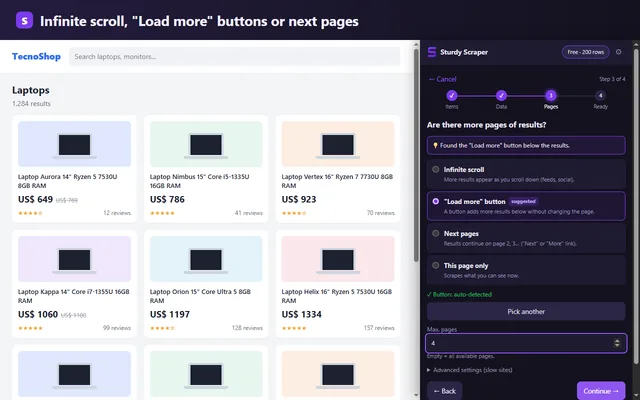
Detects infinite scroll, load more buttons and pagination by waiting for real DOM changes, not fixed delays.
Less noise, more useful CSVs
Health checks warn you before you export empty or incomplete tables.
Real use cases
For people who need data without turning the job into an engineering project.
E-commerce
Extract prices, stock and reviews from stores with infinite scroll or dynamic pagination.
Research and directories
Turn catalogs, public directories or reference listings into a clean table, without a complicated workflow.
Marketplaces and comparison sites
Capture offers and listings that change with filters, progressive loading or "more results" buttons.
Content monitoring
Keep track of posts, products or reviews without manual copy-paste or fragile scripts.
Real problems it solves
Built for the three places where common scrapers fail.
Reliable dynamic pagination
Infinite scroll, "load more" buttons and classic pagination, detected automatically and waiting for real DOM changes.
Big exports without crashes
Rows are saved incrementally in IndexedDB and large datasets are streamed straight to disk.
Broken selector alerts
Health checks before and after each job. If the site changed, you get a warning instead of a silently empty CSV.
Local data by design
Scraping happens in your browser. No data backend, no dataset telemetry and no account required to get started.
Clearer than a traditional scraper
Results show up fast: select, review and export.
The goal isn't to cram the screen with options. It's to get you to a useful CSV with fewer steps, less guesswork and less time lost on fragile setups.
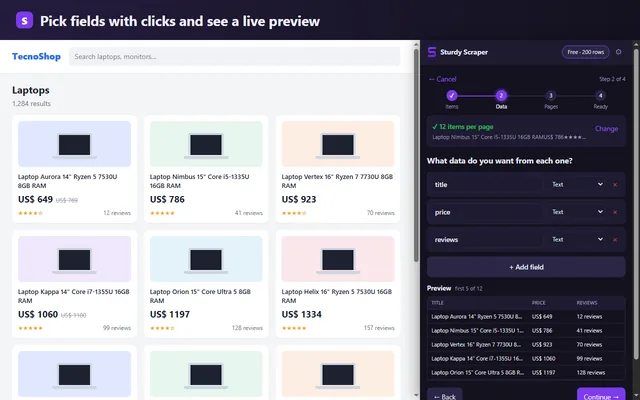
- Pick elements with simple clicks
- Visual preview before exporting
- Scroll, load more and pagination support
Visual demo
Seeing how it works beats imagining it.
Watch a single click turn into a full workflow: detect, configure, validate and export.
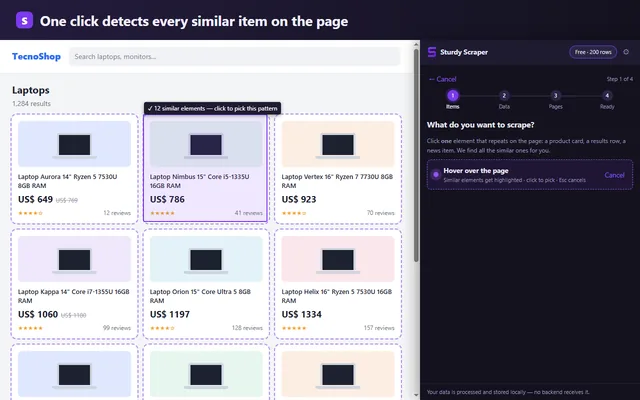
Step 1 of 4
Pick the repeating item
Click a card, row or item in the list. The extension detects that it repeats and shows how many similar elements it found to use as the scraper's context.
Real screenshots
This is the extension at work.
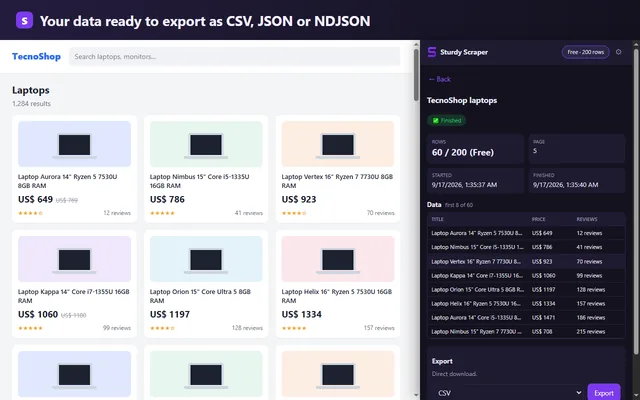
Chrome's side panel scraping a demo store, unedited.
Why people try it
Less configuration, clearer signals.
Traditional scrapers
- Fixed waits that fail on slow JavaScript.
- Exports that freeze on large datasets.
- Broken selectors that produce empty tables.
- Pricing or limits you discover too late.
Sturdy Scraper
- Waits for real changes with observers and timeouts.
- Saves while scraping and exports in chunks.
- Health checks before and after every run.
- A clear free tier: 200 rows per scrape.
Why trust it
Less friction, better results: start, review and export without wasting time.
Instead of fighting broken selectors or pages that never finish loading, Sturdy Scraper gives you a clearer flow to get a useful CSV on the first try, with less risk of losing rows along the way.
Simple pricing
Free to try it out. Pro when volume matters.
Free
$0
Try the full workflow, no credit card.
- Up to 200 rows per scrape
- Unlimited scrapers
- Dynamic pagination included
- Broken selector alerts included
Pro
USD 9/month
or USD 79/year, billed annually
For real work with large datasets.
- Unlimited rows
- Streaming export for 5,000+ rows
- CSV, JSON and NDJSON
- Self-serve checkout by Paddle
Free on the Chrome Web Store
Install it and scrape your first page in two minutes.
No account, no card. The Free plan has every feature up to 200 rows per scrape; upgrade to Pro only if you need more.
Questions, or a site that doesn't work? [email protected]
Works in Chrome, Edge, Brave and any Chromium-based browser.
Guides
Step-by-step guides to get data off the web without code.
Infinite scroll
Get every result from a page that loads more as you scroll, without missing rows.
Website data to Excel
Listings, prices or catalogs into Excel or Google Sheets without copy-pasting.
Competitor price monitoring
A spreadsheet of competitor prices that updates itself.
Instant Data Scraper alternative
What's different and when each one makes sense.
FAQ
Fair questions before installing a scraper.
Does my scraped data go through a server?
No. Scraped data is processed and stored locally in your browser. The only thing that leaves your browser is the Pro license check (email and license key), never the data you scrape.
Does it work on sites with infinite scroll?
Yes. The extension detects infinite scroll and waits for real DOM changes instead of a fixed delay picked by hand.
Can I use it on e-commerce sites and marketplaces?
Yes, especially for listings and pages that load content when you scroll or change filters. Pagination detection adapts to how each site actually loads results. Only scrape data you are allowed to, following each site's terms.
What happens if the site's HTML changes?
A health check compares match rates against a baseline. If a selector breaks, you get a warning before the run or when the job finishes.
Does it work on sites built with Web Components (Shadow DOM)?
Yes, when the Shadow DOM is open (the most common case): you pick fields inside a component with a click, same as on any other page.
Will I lose rows if the list shows two identical items?
No. If the page shows two identical items, both are exported. Only items read again while scrolling or loading more are skipped, so you don't get false duplicates.
Is it a tool for developers?
Not mainly. It's built for people who need reliable CSVs without writing CSS, XPath or scripts.
What languages is the extension available in?
English and Spanish. It follows your Chrome language automatically: the side panel, notifications, suggested column names and the checkout all switch together.