
Guide
How to extract data from a website to Excel without coding
Updated: September 17, 2026
When copy-paste stops being enough
For ten rows, copy-paste works. It breaks down with long listings: cells land in the wrong place, images and links get lost, and if the site loads more results as you scroll or spans twenty pages, you end up doing the same thing for an hour.
A visual scraper fixes exactly that: you show it once which data you want from each item, and it goes through the whole list for you.
1. Pick what repeats on the page
Open the page with the data (a product listing, search results, a directory) and in Sturdy Scraper click New scraper → Select container. Hover one of the cards or rows: the extension highlights every similar one and tells you how many it found. One click locks in the pattern.
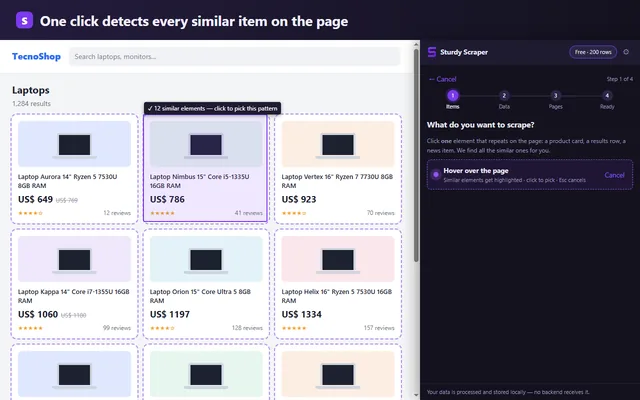
2. Click the columns you want
With Add field you click the title, price, link or image inside one card. Each click becomes a column in your spreadsheet, and the preview shows the first real rows right away so you can spot empty values before running anything.
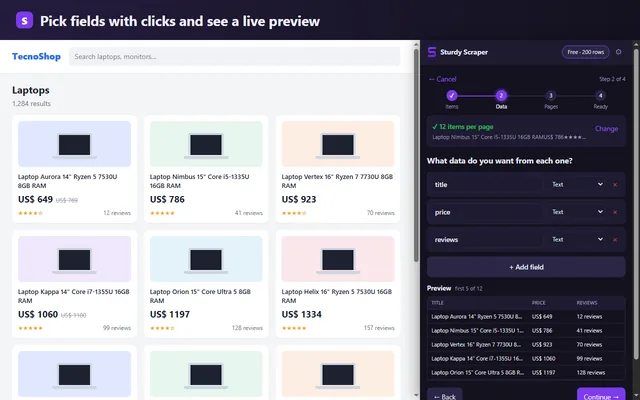
3. Tell it how the rest of the results load
This is where most tools fall short. Choose the case that matches:
- “Next” link: classic numbered pages.
- “Load more” button: the list grows on the same page.
- Infinite scroll: more results appear as you scroll.
In every case the extension waits until new content actually shows up before moving on, instead of a fixed delay that sometimes isn't enough and leaves rows behind. You can set a page limit to try it on a small run first.
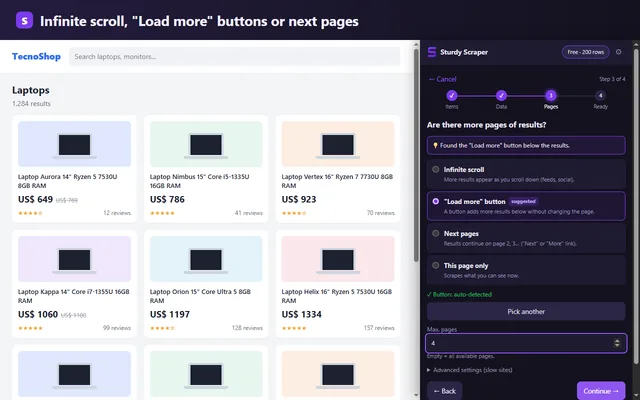
4. Export to CSV and open it in Excel
When it finishes, choose CSV and export. The file uses the encoding Excel needs to display accents and special characters correctly, so it opens with a double click, no import wizard. In Google Sheets: File → Import → Upload.
For huge listings (tens of thousands of rows) the extension writes the file to disk in chunks without loading everything into memory. If an export gets interrupted, the rows are still saved in your browser and you export again with one click.
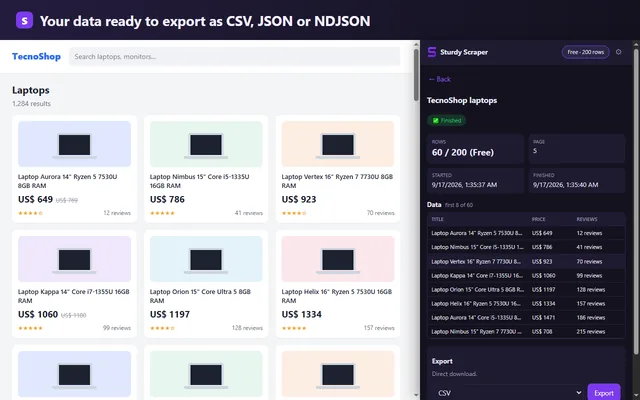
If the site changes
Sites change their HTML without notice, and a scraper that used to work starts returning empty columns. Sturdy Scraper compares each run with the first one and warns you when a field stops matching, before you find out from a spreadsheet you already shared.
What data to extract (and what not to)
Use it for public, structured information: prices, catalogs, listings, business directories. Respect each site's terms and don't build personal contact lists for marketing. Everything you extract stays in your browser; it never goes through a server.
FAQ
Do I need to know how to code or use XPath?
No. Everything is picked with clicks on the page; the extension generates the selectors.
Is it free?
The Free plan includes every feature up to 200 rows per scrape, no credit card. Pro is USD 9 per month or USD 79 per year and removes the limit.
Does it work with Google Sheets?
Yes. Export to CSV and import it into Sheets, or use JSON if another tool will process it.
Keep reading
Guide: infinite scroll · Guide: competitor price monitoring · Instant Data Scraper alternative · Web Scraper alternative · Changelog