
Guide
How to scrape infinite scroll pages without coding
Updated: September 23, 2026
Why infinite scroll breaks most scrapers
On an infinite scroll page the results aren't all in the HTML: they show up in batches as you scroll. Many extensions handle this by scrolling and waiting a fixed time, say two seconds. If the site takes three, the next batch hasn't arrived yet, the scraper decides the list is over, and you get half the rows without any warning.
The opposite problem is just as common: when the page redraws the list as you scroll, the scraper reads the same items again and the export comes out full of duplicates.
1. Pick one item in the list
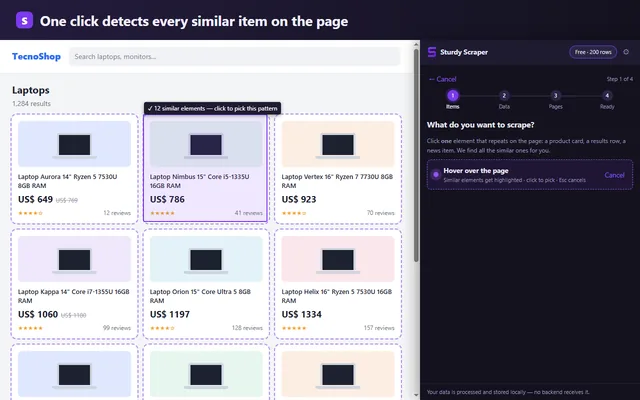
Open the page and in Sturdy Scraper click New scraper → Select container. Click one result card or row: the extension highlights every similar one and tells you how many it sees right now. Then add your columns (title, price, link, image) by clicking inside that same card.
2. Choose “Infinite scroll” as pagination
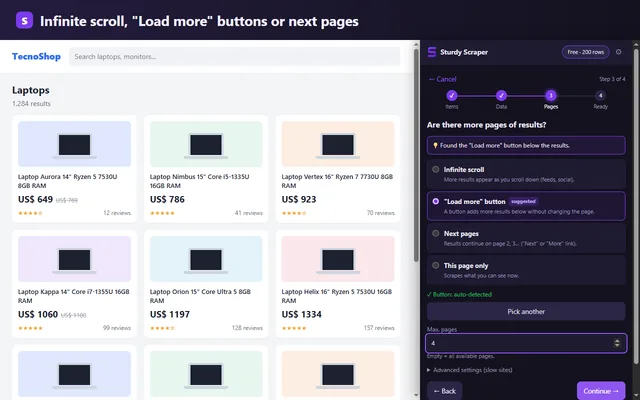
In the pagination step the extension tries to detect how the page loads more results. If it doesn't, pick Infinite scroll yourself. Set a page limit for a short first run.
While it runs, instead of waiting a fixed time, the extension watches the page and only moves on when new items actually appear. If no new content shows up after several tries, it stops and tells you so: “the page stopped loading more”.
Lists that scroll inside a panel
Some sites don't scroll the whole page: the list lives in a panel with its own scrollbar (maps, inboxes, side panels). Sturdy Scraper finds that panel and scrolls inside it, so that case works too.
No fake duplicates, no missing rows
Items read again while scrolling aren't repeated in the export. And if the list really contains two identical items (two products with the same name and price), both are exported: only what was already read is skipped.
3. Export
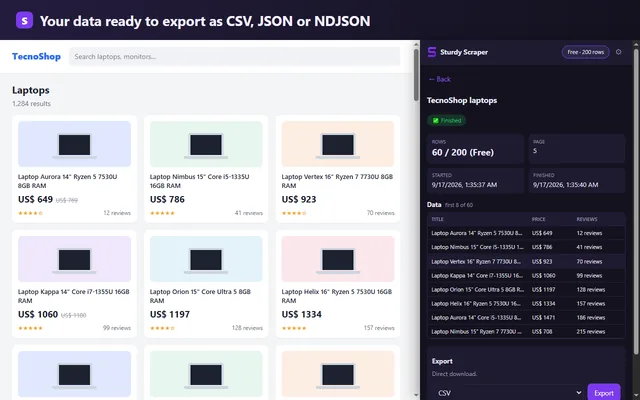
When it's done, export to CSV for Excel or Google Sheets, or to JSON/NDJSON to process it with another tool. Large exports are written to disk in chunks without filling the browser's memory.
Before you start
Use it on public data and follow each site's terms. If a site requires logging in or blocks automated access, don't push it. Everything you extract stays in your browser and never goes through a server.
FAQ
How many rows can I get for free?
The Free plan has every feature up to 200 rows per scrape, with no account or card. Pro (USD 9 per month) removes the limit.
What if the site is slow to load?
The extension waits for new items to appear on the page instead of a fixed delay, so a slow site doesn't leave rows out.
Does it work with “Load more” buttons?
Yes, that's another pagination mode: the extension clicks the button and waits for the list to grow before moving on.
Keep reading
Guide: website data to Excel · Instant Data Scraper alternative · Guide: competitor price monitoring · Changelog